
Omnio3.22.00 - Google Play
You'll be able to see results in few seconds.
Publisher Description
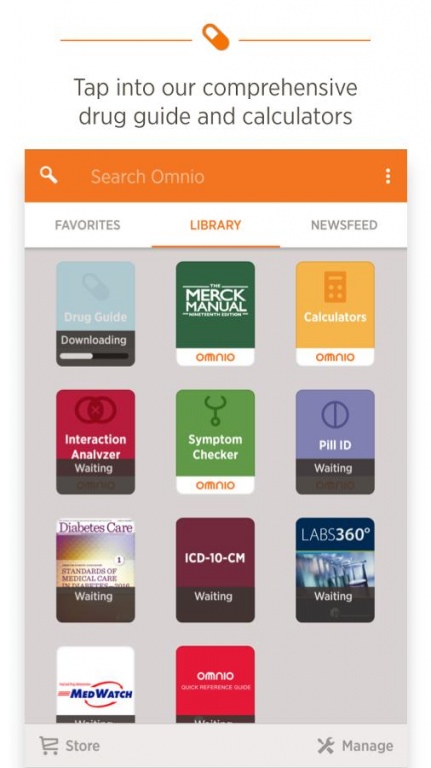
Designed with the healthcare professional’s clinical workflow in mind, Omnio gives you quick and easy access to important and relevant medical information.
// What users have said about recent Omnio updates
• “Well done people. Really I am so satisfied from the new change from the previous interface. Good job.”
• “Latest update is a massive improvement…interface is a lot more user friendly. Don't have to go too deep to search for information. Great job.”
• “This is really good, I love it. It’s my companion.”
// Features
• NEW! Favorites: Keep your most important resources one tap away
• Drug Guide: Comprehensive database of US brands and generics, with formulary from 7,000 health plans
• Disease Guide: Free access to The Merck Manual, the world’s best-selling medical textbook, fully integrated for seamless use with relevant drug information and calculators
• Calculators: Contain intuitive indices with an easy-to-use interface
• Newsfeed: Be the first to know the latest through curated news and ideas for your specialty
• Also included: Interaction analyzer, pill identifier, and dosing calculators
Access essential, free specialty resources from trusted sources:
• American Diabetes Association
• National Comprehensive Cancer Network
• And more
Visit our in-app store that offer 300+ premium resources in 35+ medical specialties, integrated into a seamless, cross-indexed library
About Omnio
The company that develops Omnio is Aptus Health, Inc.. The latest version released by its developer is 3.22.00.
To install Omnio on your Android device, just click the green Continue To App button above to start the installation process. The app is listed on our website since 2016-06-14 and was downloaded 0 times. We have already checked if the download link is safe, however for your own protection we recommend that you scan the downloaded app with your antivirus. Your antivirus may detect the Omnio as malware if the download link to com.skyscape.android.ui is broken.
How to install Omnio on your Android device:
- Click on the Continue To App button on our website. This will redirect you to Google Play.
- Once the Omnio is shown in the Google Play listing of your Android device, you can start its download and installation. Tap on the Install button located below the search bar and to the right of the app icon.
- A pop-up window with the permissions required by Omnio will be shown. Click on Accept to continue the process.
- Omnio will be downloaded onto your device, displaying a progress. Once the download completes, the installation will start and you'll get a notification after the installation is finished.
Program Details
System requirements
Download information
Pricing
Version History
version 3.22.00
posted on 2016-06-14
Hello there! Here's what we've worked on for this release:,• Bug Fixes,If you like what you see (we hope you do!), you can help others learn about Omnio by writing a review in the Google Play store.
version 1.3.7
posted on 2011-04-29
Several fixes and updates
Disclaimer
Official Google Play Link
We do not host Omnio on our servers. We did not scan it for viruses, adware, spyware or other type of malware. This app is hosted by Google and passed their terms and conditions to be listed there. We recommend caution when installing it.
The Google Play link for Omnio is provided to you by apps112.com without any warranties, representations or guarantees of any kind, so access it at your own risk.
If you have questions regarding this particular app contact the publisher directly. For questions about the functionalities of apps112.com contact us.
